How to Scan Receipts for Tax Season on iPhone
Last updated 2026-10-29
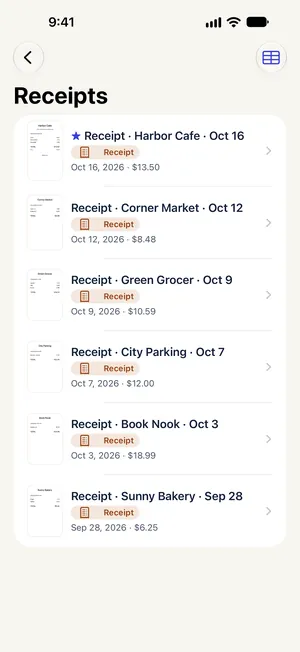
Tax season usually starts with digging receipts out of wallets and drawers. Paperkeep files each scan as a receipt and reads its date and total onto the list, so you can tell them apart without opening each one. Capturing, sorting and finding receipts costs nothing.
First, with iOS's built-in tools
- In the Notes app, create a note, tap the attachment button (a camera or paperclip) and choose “Scan Documents”.
- A dark desk or notebook cover behind a white receipt helps the camera find its outline. Keep capturing, then tap “Save” once the pile is done.
- Title the note something like “2026 expenses” so a Notes search brings it back.
- Notes won't pull out dates or totals, so adding up amounts is still on you.
With Paperkeep
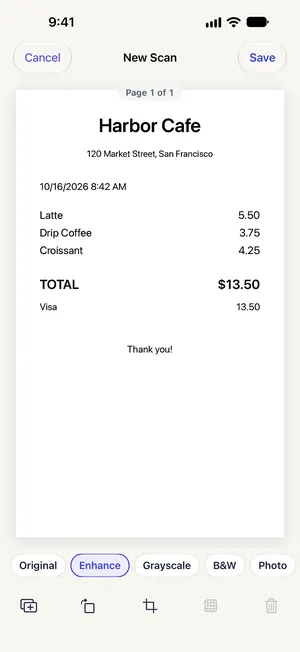
- Tap “Scan” and capture one receipt. Save each receipt as its own scan so Paperkeep can read a date and total for every one.
- On the “New Scan” screen, the “Enhance” filter darkens faint thermal print. Then tap “Save”.
- Once the text is read, the type becomes “Receipt” and a “Date” and “Total” appear. If the type is wrong, change it with “Type” on the document screen.
- On the main Documents screen, open “Smart Folders” → “Receipts” to see every receipt with its date and amount.
- Type a shop name or amount into the search field to find a receipt by the text printed on it.
Tips for this document
- Thermal paper fades within months, so scan a receipt the day you get it.
- Say “Scan a receipt with Paperkeep” to Siri to open the scanner and file the result as a receipt; the Lock Screen widget and the “Scan Document” control in Control Center open it quickly too.
- The IRS generally asks you to keep records that support a return for three years, and longer in some situations. Check with a tax professional for your case.
- Text recognition can misread digits, so compare amounts against the image before you copy them anywhere.
Coming soon to the App Store.